










Avoid confusion with a unified operation screen, even when accessing various file management services. Once user IDs and passwords are registered in advance, there is no need to log in to file management services every single time.
A simple flow function is provided to process and distribute scanned documents. Scanned documents can be attached and sent by email or stored in a shared folder on the network.
For example, documents saved to cloud services can be accessed from the control panel of devices and printed.
- *15 SMB, FTP, email, Google DriveTM are supported as standards. DocuShare, Salesforce, OneDrive®, SharePoint Online, ABBYY® FlexiCapture® are supported optionally.
- Image processing
- Scan settings
- Email sending of scanned documents
- Links with file management services
- Printing of saved documents
- Email notifications
- Cost management*16
- *16 Optional for Entry Edition.
- *17 Optional
Various processes can be set by establishing rules as "flows" in advance. A series of processes is performed automatically such as document processing, distribution, outputting, and saving by simply importing documents from received faxes and scan operations.
Processes such as format conversion and OCR processing*18 that go along with importing documents can be performed automatically. High-level processing can also be standardized, including sorting for addresses based on the text strings extracted through OCR.
- *18 A separate option is required.
- Import documents
- Generate data (Document names, QR code reading*19, attribute mapping, form analysis*19, etc.)
- Document distribution (Distribution jobs, multi-sending, form analysis result output*19, etc.)
- Error notification
- *19 Optional
ApeosWare Management Suite 2 offers an "Entry Edition" for easy implementation and an "Enterprise Edition" with Print On Demand and cost management as standard features. In addition, the features can be adapted to your needs.
For the Entry Edition and Enterprise Edition, the amount of data to be handled by the system can be controlled according to the specifications of the server.
| Entry Edition | Enterprise Edition |
|---|---|
| Basic features including device, user and log management are offered in an all-in-one configuration. | Redundant and distributed configurations are available. Print On Demand and cost management features are standard. |
|
Redundant configuration |
|
|
Distributed configuration |
|
|
Paid scan & connect*1 |
|
|
Print on demand*1 |
Print on demand |
|
Cost management*1 |
Cost management |
|
Image log control feature*1 |
|
|
Flow management feature*1 |
|
|
Device license*1 |
|
|
Basic scan & connect |
|
|
Mobile user license*2 |
|
|
Basic print feature |
|
|
Log management feature |
|
|
User management feature |
|
|
Device management feature |
|
- *1 Optional
- *2 Separate user licenses are required for 11 or more users.
ApeosWare Management Suite 2 can be configured as a system adapting to the IT needs of customers. In an all-in-one configuration, high-level features are bundled onto a single server. It allows input and output of documents with a minimum of investment and contributes to resolving the various challenges the customers may face. In addition, Enterprise Edition supports redundant and distributed configurations to satisfy high-level system requirements.
- * Only Enterprise Edition
ApeosWare Management Suite 2 manages network devices such as multifunction devices and printers, and the users of those devices, and is a software that comprehensively manages authentication, output, log accounting and document distribution.
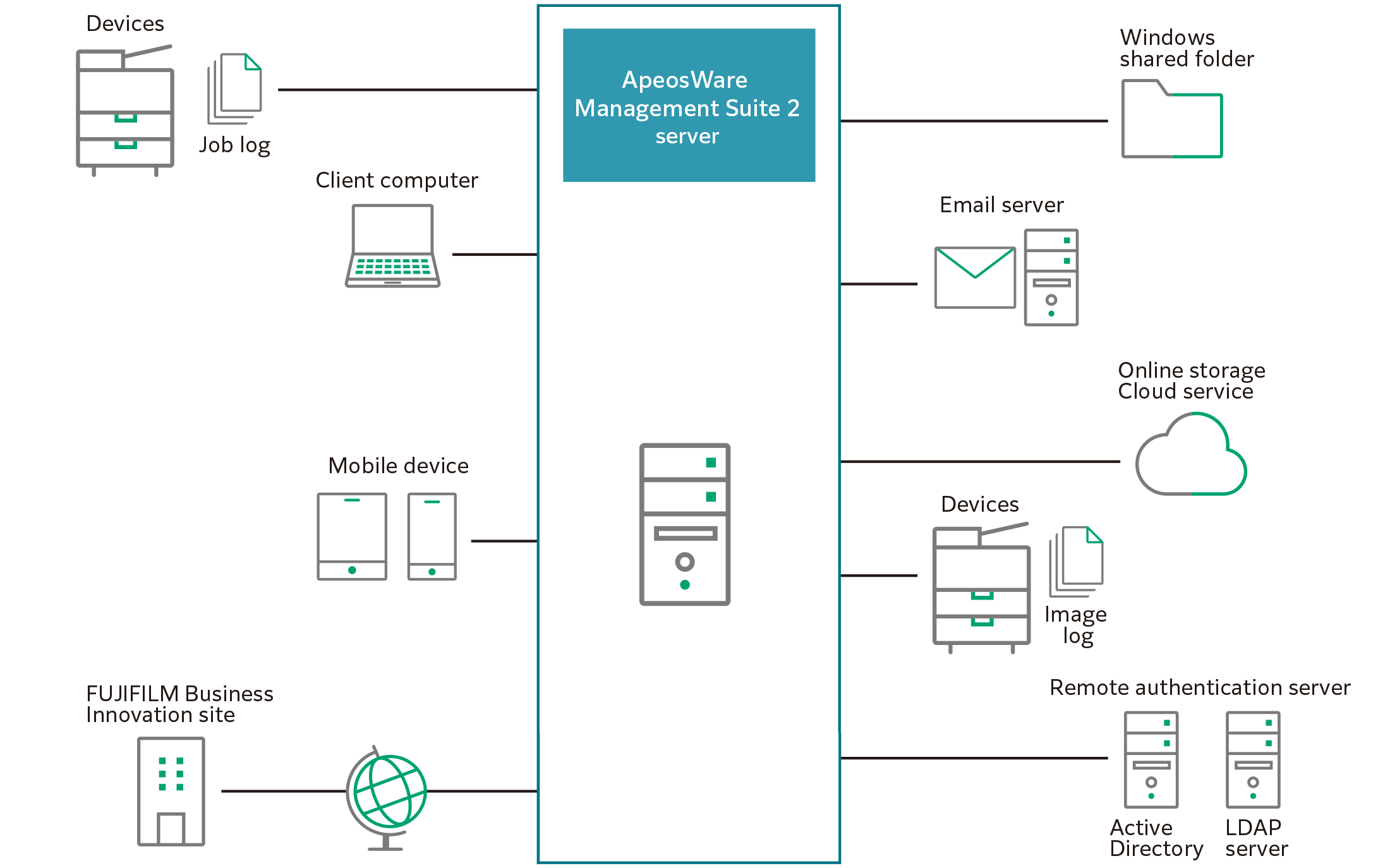
- Device Management
- User Management
- Cost Management
- Print Management
- Link Scan Settings with File Management Service
- Image Log Control
- Operating Mobile Device
- Accounting report creation
- Job Logs Management
- Server Monitoring
- Document Distribution by Flow
- Updates Software