









As MitoQ’s teams became more globally connected and hybrid meetings increased, the business identified an opportunity to improve the meeting room experience. A more seamless, reliable and user-friendly solution was needed to better support collaboration across locations.
MitoQ partnered with the Connected Workspaces team at FUJIFILM Business Innovation New Zealand (FBNZ) to create a simple, reliable Microsoft Teams Rooms environment. Meeting rooms and shared spaces are now one-touch collaboration hubs, reducing pressure on IT support and enabling teams to work together effortlessly, wherever they are in the world.
In the late 1990s, two New Zealand scientists investigated why some parts of the body struggle to absorb antioxidants effectively. Their research led to the creation of Mitoquinol Mesylate - a unique molecule designed to support mitochondrial health.
Today, MitoQ develops and sells patented supplements to customers around the world. That same spirit of innovation runs through the business today.
“We’re an innovative company, so our leadership team is always pushing us to be creative and step out of our comfort zones,” says MitoQ IT Manager, Ibin Joe.
As MitoQ continues to help people improve their health, the business itself has evolved - expanding internationally and rethinking how the various teams work. When the lease on its New Zealand headquarters was coming to an end, MitoQ took the opportunity to right-size its space for a more flexible, hybrid way of working, while still bringing people together, even when they aren’t in the same location.
“Five years ago, we anticipated growing our New Zealand team,” Ibin says. “What we didn’t anticipate was just how globally distributed our teams would become. Having a central, connected workplace now plays a critical role in keeping everyone aligned and working as one.”

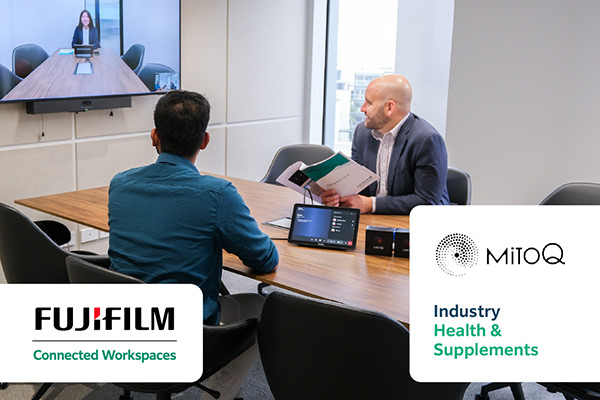
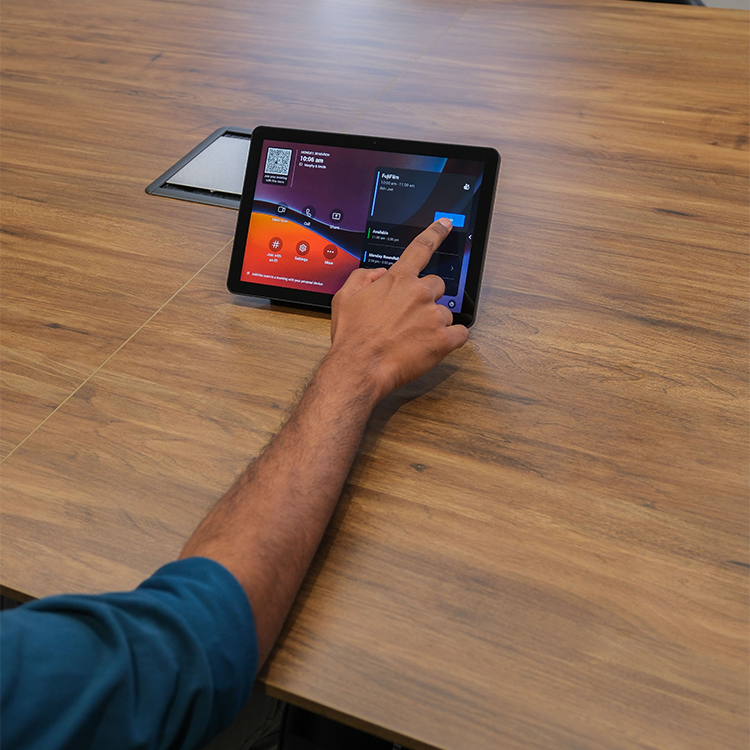
Microsoft Teams Rooms hardware replaces a messy, PC-based meeting setup with an intuitive, one-touch join meeting experience.

Town hall meetings and hybrid calls can start instantly, removing setup delays and freeing IT from constant troubleshooting.

Modern meeting spaces help teams in New Zealand connect with colleagues in China, the US and remote locations.
Before moving into its new office space, MitoQ recognised that its existing meeting room setup was no longer meeting the needs of a modern, hybrid workforce.
“Our previous setup wasn’t delivering the consistent and reliable experience we wanted for our teams,” says Ibin. The existing environment required more hands-on support than expected and was not always intuitive for users.
At times, audio and video issues affected the meeting experience, and remote participants could face challenges with sound quality. On occasion, system updates also interrupted meetings at inconvenient moments.
For the IT team, this meant time and effort were being spent on resolving avoidable meeting room issues instead of focusing on broader strategic priorities.
“We were regularly stepping in to support meetings and troubleshoot issues, which highlighted the need for a more dependable solution,” says Ibin.
These challenges became even more apparent during company-wide town hall meetings.
The setup - which could take between 15 and 20 minutes - involved a mobile screen mounted on a trolley, multiple devices, and manual workarounds to ensure remote participants could clearly see and hear the speaker. Camera placement also proved inconsistent, making it difficult to deliver a reliable experience for remote attendees.
“Someone from IT had to be there during the meeting,” Ibin says. “We had to test the sound, check the camera, and make sure everything was connected properly.”
Even then, if the setup wasn’t perfect, remote participants often struggled to follow the discussion. For a business with globally distributed teams, that was far from ideal.
When MitoQ began designing its new office, one of the leadership team’s priorities was technology - specifically, meeting room systems. The IT team already knew the direction they wanted to take.
“Microsoft Teams Rooms had been part of our longer term direction for improving meeting spaces,” Ibin says.
After exploring multiple vendors, MitoQ chose FBNZ - specifically the Connected Workspaces team. The difference came down to fit.

The Connected Workspaces team mapped out a workplace technology plan that integrated seamlessly with the physical space, including town hall TV recessed into walls and audio equipment carefully placed to maintain the office’s aesthetic and ambience. The result is a clean, modern environment where technology enhances the workspace, rather than disrupting it.
Alongside the meeting technology, Connected Workspaces implemented digital signage displays to support internal communication and branding. Screens in shared areas display company messaging, announcements and product promotions. During celebrations such as the Chinese New Year, the team uses the displays to run themed content for staff.
The final piece of the meeting room puzzle was implementing multiple Microsoft Teams Rooms, powered by Yealink hardware.
This allows any room in MitoQ’s office to deliver a consistent, one-touch join meeting experience, including the town hall space, which now features a large-format display, professional microphones and ceiling speakers.
“When we moved into the new town hall setup, the response was immediately positive,” says Ibin. “There was no preparation required - we handed the microphone to our CEO, and the session simply worked.”
Since implementation and in the weeks following the office move, the impact on the IT team has been immediate, with virtually no meeting room–related support requests.
Connecting to the new meeting room system is much easier now, and the audio quality is outstanding. Previously, those working remotely or offshore struggled to hear conversations in the meeting room, but this issue has been resolved.
“One thing I’ve noticed—if I’m not hearing about issues, it means it’s working as expected,” says Ibin.
Instead of troubleshooting meeting rooms, the IT team can now focus on higher value, strategic work.
“I don’t want meeting rooms to require ongoing attention,” Ibin adds. “They should just work.”
MitoQ began as a science-led company built on innovation in New Zealand. Today, it’s a global business with teams, customers and partners spread across multiple markets.
With Microsoft Teams Rooms, it now has a workplace that can keep pace with that global presence. Meetings happen on time and without technology disruptions, whether teams are in the same room or across the world.
The company is also better positioned for what comes next. With a more connected digital environment and IT no longer tied up with meeting related troubleshooting, MitoQ can focus on higher value, strategic priorities.
Technology now supports innovation, rather than getting in the way.
