






FUJIFILM IWpro ช่วยให้ธุรกิจของคุณชนะอุปสรรคเพื่อเปลี่ยนผ่านสู่ความเป็นดิจิทัลได้อย่างสมบูรณ์แบบ
FUJIFILM IWpro คือโซลูชันแบบครบวงจรในแพลตฟอร์มที่ปลอดภัยสำหรับการแปลงธุรกิจให้เป็นดิจิทัล โดยมีพื้นที่ทำงานสำหรับการทำงานร่วมกัน เพิ่มประสิทธิภาพให้กับเวิร์กโฟลว์ การจัดการเอกสารอย่างมี ประสิทธิภาพสำหรับเมตาดาต้าและเอกสารต่างๆ รวมทั้งความสามารถในการพิมพ์บนคลาวด์ที่หลากหลาย

ปรับปรุงข้อมูลและรูปแบบการทำงาน ให้มีความคล่องตัว ลดการพึ่งพาผู้อื่น ช่วยส่งเสริมให้ทีมทำงานร่วมกันได้อย่างมีประสิทธิภาพและประสิทธิผลมากขึ้น

ไม่จำเป็นต้องมีทักษะด้านไอทีและไม่ต้องมีการปรับเปลี่ยนครั้งใหญ่สำหรับระบบที่ใช้อยู่ในปัจจุบันรวมทั้งรูปแบบการสื่อสารกับภายนอก
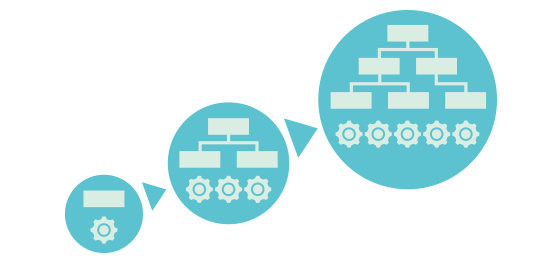
ใช้งานง่าย ลดการทำงานด้วยตนเอง จากช่องว่างระหว่างระบบให้เหลือน้อยที่สุด เป็นโซลูชันที่สมบูรณ์แบบสำหรับการทำงานที่ต้องใช้เอกสารและข้อมูลที่ หลากหลาย

เอกสารจะถูกนำเข้า แปลงเป็นข้อมูลดิจิทัลโดยอัตโนมัติ และ ใช้งานได้จากระบบคลาวด์
ให้คุณแชร์สถานะของงานและความคืบหน้าระหว่างสมาชิกในทีม และเชื่อมโยงกับระบบธุรกิจที่ใช้อยู่ในปัจจุบันได้อย่างไร้รอยต่อ
สร้างพื้นที่การทำงานร่วมกันให้เป็นพื้นที่ที่สามารถรวมทุกสิ่งและทุกคนให้มารวมตัวกันได้ในจุดเดียว ให้ทำงานร่วมกันได้ทั้งภายในและภายนอก
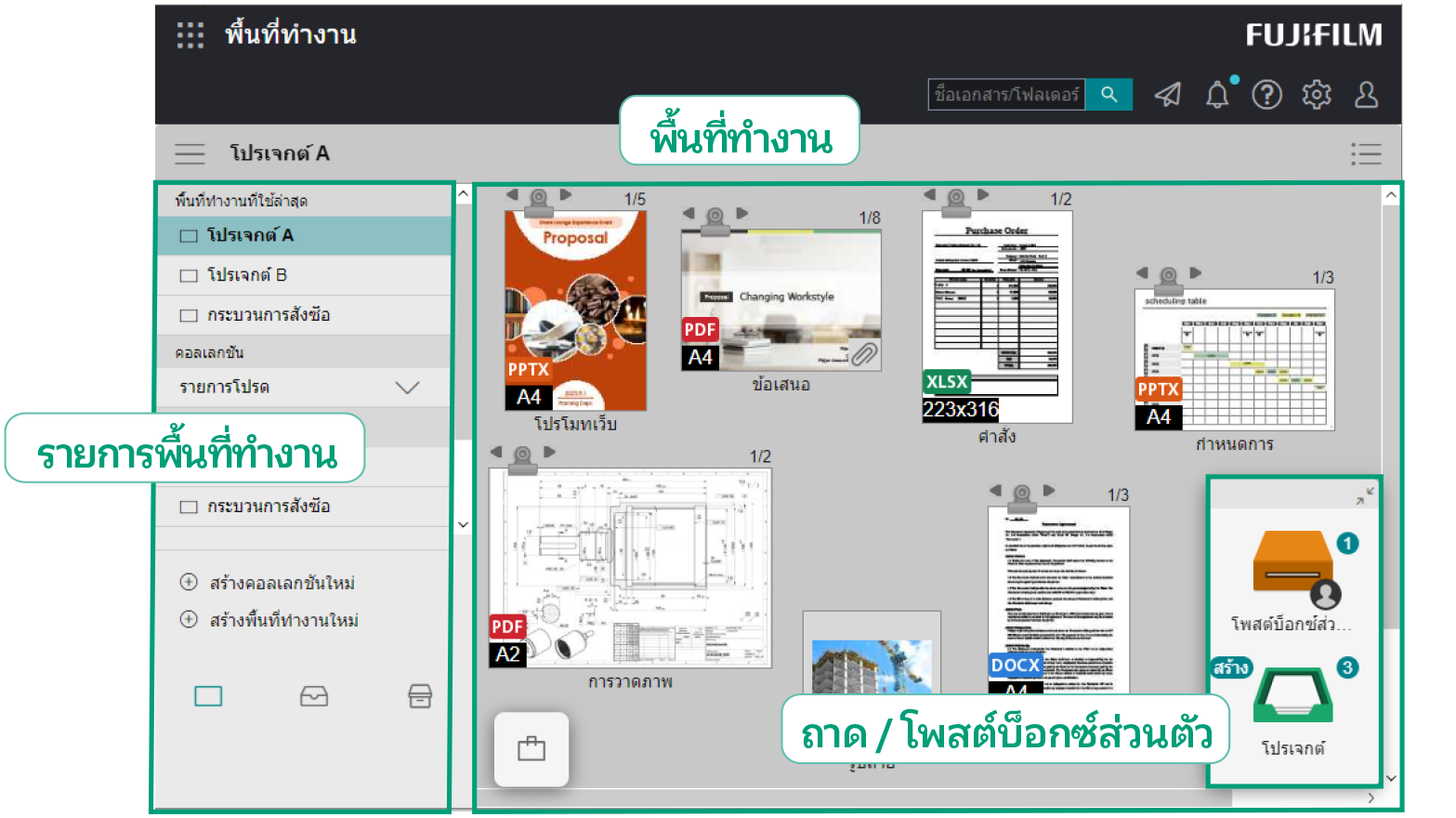
พื้นที่ทำงานคืออะไร
พื้นที่ทำงาน คือพื้นที่ที่คุณสามารถเข้ามาใช้งานเอกสารต่างๆ ที่เกี่ยวข้องได้ รวมถึงการดู การแชร์ และการแก้ไขเอกสาร
ถาด / โพสต์บ็อกซ์ส่วนตัวคืออะไร
ถาดและโพสต์บ็อกซ์ส่วนตัวจะช่วยให้ผู้ใช้งานสามารถถ่ายโอนข้อมูลระหว่างกันได้เพียงแค่ทำการลากและวาง
ถาดที่ใช้ร่วมกันสำหรับสมาชิกในทีม
ใช้ถาดเพื่อส่งไฟล์ระหว่างผู้ใช้ที่ลงทะเบียนไว้
โพสต์บ็อกซ์ส่วนตัว: ถาดส่วนตัว
ใช้โพสต์บ็อกซ์ส่วนตัวเพื่อส่งไฟล์ไปยังผู้ใช้ที่เจาะจง
- หมายเหตุ: โพสต์บ็อกซ์ส่วนตัวจะถูกสร้างขึ้นโดยอัตโนมัติเมื่อมีการลงทะเบียนผู้ใช้
แชร์การอัปเดตสถานะงานกับสมาชิกในทีมได้อย่างมีประสิทธิภาพ
แชร์เอกสารระหว่างองค์กรหรือกับลูกค้าอย่างมีประสิทธิภาพผ่านพื้นที่ทำงาน เพื่อเพิ่มประสิทธิภาพการทำงานร่วมกันทั้งภายในและภายนอก
สร้างพื้นที่ทำงานหลายแห่งสำหรับงานที่ต่างกัน
สามารถสร้างพื้นที่ทำงานที่หลากหลายสำหรับโครงการ วัตถุประสงค์ ลูกค้า ฯลฯ ที่แตกต่างกัน และกำหนดสมาชิกที่เกี่ยวข้องสำหรับพื้นที่ ทำงานนั้นๆ ได้ตามความเหมาะสม
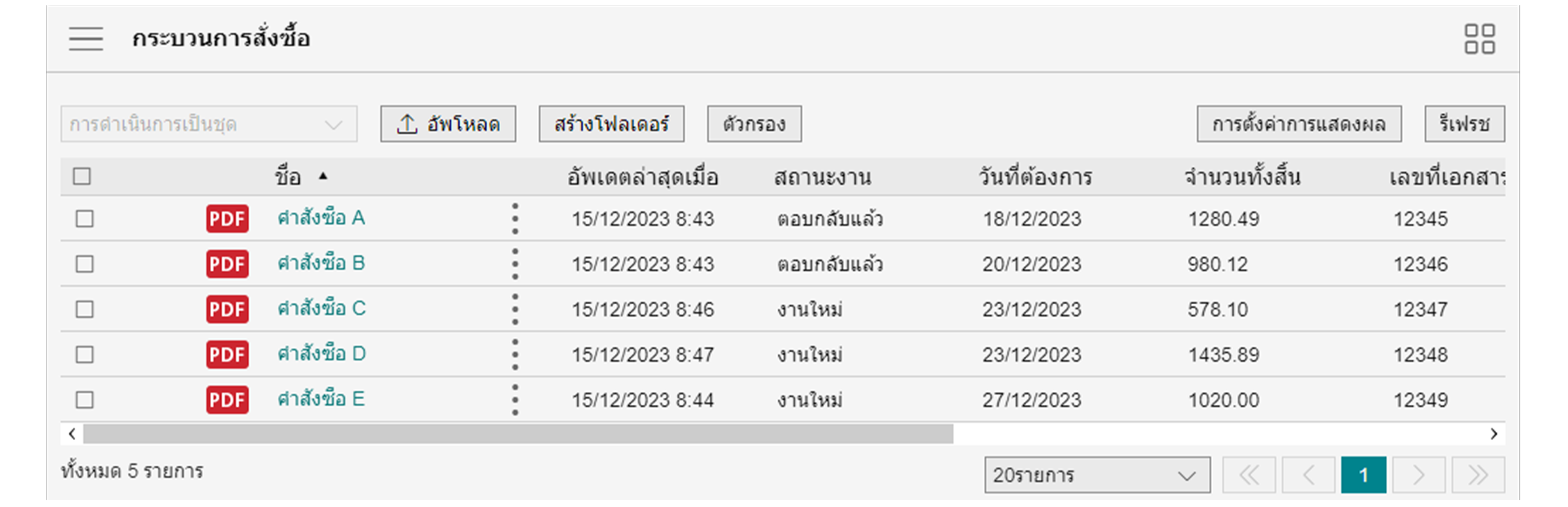
มุมมองรายการ
ข้อมูลเอกสารจะแสดงอยู่ในรูปแบบตาราง
การใช้มุมมองรายการทำให้ง่ายต่อการระบุเอกสารจากข้อมูลที่เกี่ยวข้อง เช่น ชื่อลูกค้า วันที่ ชื่อบุคคลที่กำหนด และสถานะของงาน
มุมมองรูปขนาดย่อ
ภาพของเอกสารในพื้นที่ทำงานนั้นจะแสดงเป็นรูปขนาดย่อ คุณสามารถดูเอกสารต่างๆ ได้อย่างง่ายดายผ่านข้อมูลภาพ
ผู้ใช้สามารถเพิ่มข้อคิดเห็นลงในเอกสารได้ โดยสมาชิกคนอื่นๆ จะสามารถมองเห็นข้อคิดเห็นดังกล่าวและสื่อสารกับผู้ส่งได้ทันที ลดความยุ่งยากจากการส่งอีเมลและไฟล์แนบในแบบเดิมๆ
ผู้ใช้สามารถเพิ่มข้อคิดเห็นลงในเอกสารได้เมื่อจัดเก็บไว้ในถาดหรือโพสต์บ็อกซ์ส่วนตัว หากมีการจัดเก็บเอกสารใหม่ ระบบจะทำการแจ้งเตือนทันทีในรูปแบบของไอคอนหรือข้อความ ช่วยลดความล่าช้าในการดำเนินการเอกสารอันเนื่องมาจากการพลาดเช็คอีเมลที่เกี่ยวข้องจากกล่องจดหมายของผู้ใช้
คุณสามารถแก้ไขเอกสารเดียวกันได้พร้อมๆ กันจากสมาชิกหลายคนที่เชื่อมโยงกันอยู่ทางออนไลน์ ช่วยลดเวลาที่ใช้ในการดำเนินโครงการให้เสร็จได้อย่างรวดเร็วด้วยการทำงานที่ต่อเนื่องและทันเหตุการณ์
- หมายเหตุ: ต้องมีสัญญา Microsoft 365
การล็อกเอกสารจะเป็นการป้องกันไม่ให้มีการแก้ไขโดยผู้ใช้รายอื่น
ลดความซับซ้อนของงานที่ต้องทำด้วยตัวเองด้วยการผสานรวมขั้นตอนการทำงานเหล่านั้นเข้ากับระบบที่มีอยู่เพื่อเพิ่มประสิทธิภาพเวิร์กโฟลว์
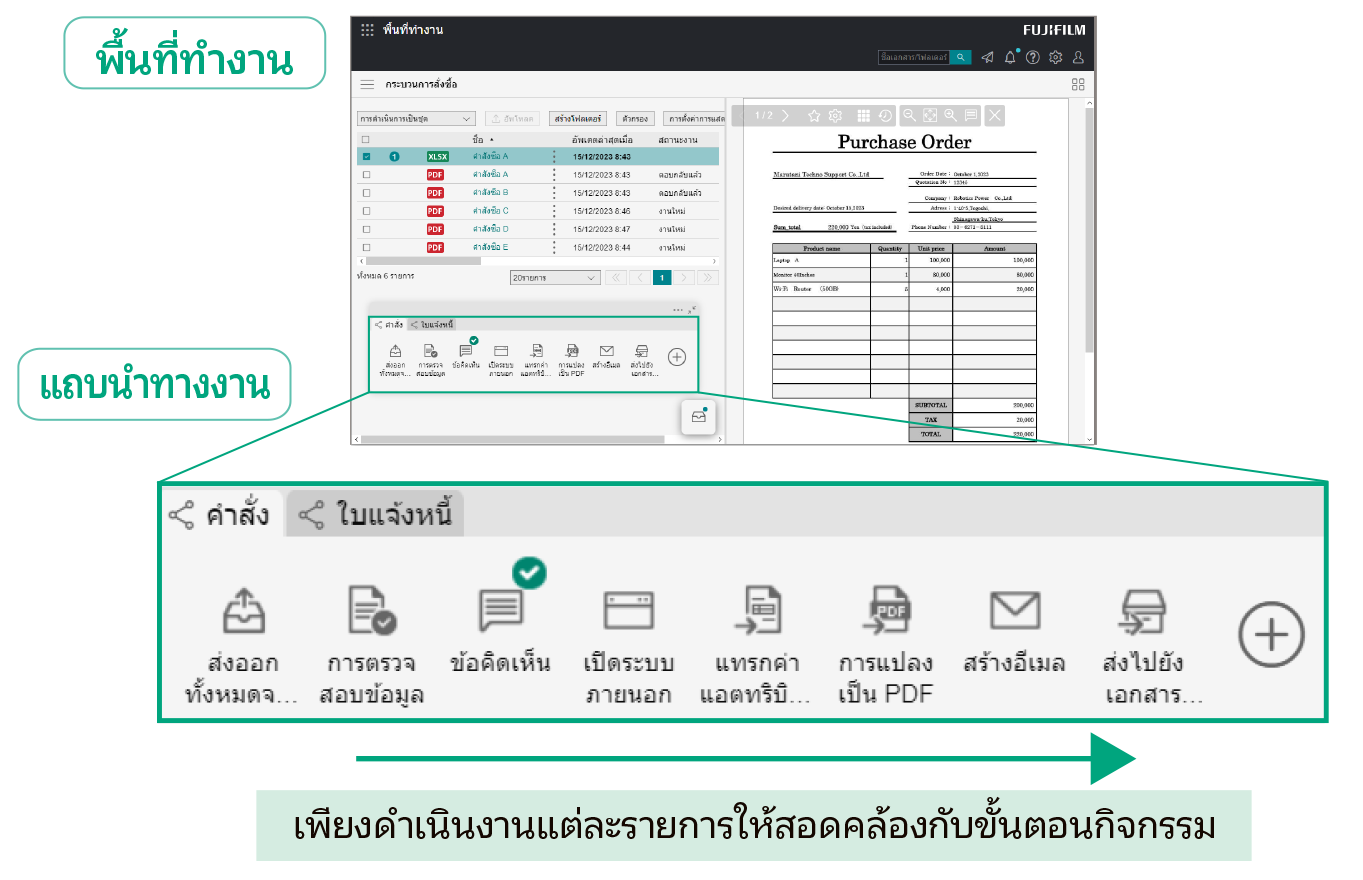
แถบนำทางงานคืออะไร
แถบนำทางงาน คือแถบเครื่องมืออเนกประสงค์ที่จะช่วยให้คุณสามารถบันทึกและจัดการขั้นตอนการทำงานต่างๆ ให้เป็นไปตามเวิร์กโฟลว์ของคุณ กระบวนการเหล่านี้รวมถึงการนำเข้าและการแก้ไขเอกสาร การเรียกระบบธุรกิจ และการส่งมอบ/การจัดเก็บเอกสาร เมื่อคลิกปุ่มเมนูบนแถบนำทางงานแต่ละรายการ คุณจะสามารถดำเนินการสำหรับโฟลว์งานของคุณได้อย่างมีประสิทธิภาพ ลดข้อ
ผิดพลาดและการทำงานที่ซ้ำซ้อน
คุณสามารถลงทะเบียนและบันทึกขั้นตอนการทำงานที่จำเป็นต่อการทำงานไว้ในแถบนำทางงานได้ ช่วยให้ขั้นตอนการทำงานง่ายขึ้น ลดข้อผิดพลาดและการทำงานซ้ำซ้อนให้เหลือน้อยที่สุด ปรับปรุงประสิทธิภาพการทำงาน ปรับขั้นตอนต่างๆ ที่เกี่ยวข้องกับงานให้เหมาะสม ช่วยลดการกำกับดูแลและการทำงานซ้ำใหม่ ส่งผลให้ธุรกิจมีประสิทธิภาพและประสิทธิผลที่ดีขึ้น
สามารถใช้แถบนำทางงานร่วมกันได้ระหว่างสมาชิกที่ใช้พื้นที่ทำงานเดียวกัน เช่น ทีมการประมวลผลใบสั่งซื้อ
มีเครื่องมือที่หลากหลายที่จะช่วยให้คุณทำงานกิจกรรมเฉพาะสำหรับเวิร์กโฟลว์ของคุณได้ในคลิกเดียว
จัดเรียงเครื่องมือบนแถบนำทางงานให้มีการวางรูปแบบปุ่มที่เหมาะสมกับเวิร์กโฟลว์ของคุณ
รองรับการปรับแต่งแถบนำทางงานให้เหมาะสมกับเวิร์กโฟลว์ที่ใช้อยู่
ตัวอย่าง)
การประมวลผลใบสั่งซื้อ
การจับภาพจากหลายช่องทางและจัดส่ง
ตัวอย่างการจับภาพจากหลายช่องทางและจัดเก็บในการจัดการไฟล์์
ใช้งานได้จากหน้าต่างของบริการภายนอก
เพียงคลิกปุ่มบนแถบนำทางงาน หน้าต่างบริการภายนอกจะเปิดขึ้น ซึ่งจะช่วยให้ผู้ใช้สามารถเข้าถึงเอกสารและข้อมูลที่ได้รับการจัดการและจัดเก็บไว้ในระบบธุรกิจได้ง่ายๆ ผ่านทางเบราว์เซอร์
เชื่อมโยงกับระบบของคุณได้อย่างไร้รอยต่อ
ดำเนินการเกี่ยวกับข้อมูล เช่น การลงทะเบียนไฟล์ในระบบ การลงนามในสัญญาทางอิเล็กทรอนิกส์ และการโพสต์ในแบบฟอร์มการอนุมัติในหน้าต่างของบริการภายนอก เพื่อลดขั้นตอนจากการป้อนข้อมูลด้วยตนเองในแบบเดิมๆ
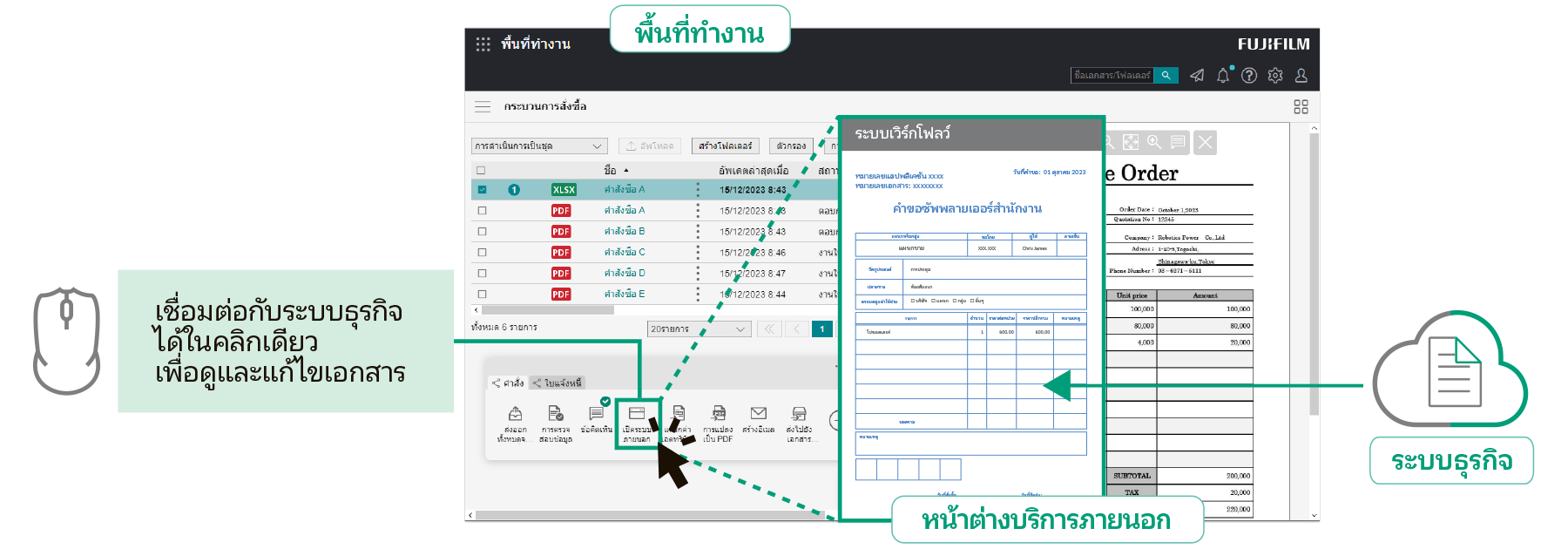
นำเสนอเครื่องมือเพื่อเชื่อมโยงกับระบบธุรกิจที่คุณใช้อยู่ในปัจจุบันให้สามารถติดตั้งบนแถบนำทางงานและทำงานได้ในคลิกเดียว
ข้อมูลเอกสาร เช่น ชื่อลูกค้า วันที่ และชื่อของบุคคลที่รับผิดชอบ สามารถคัดแยกออกมาในรูปแบบ CSV และเชื่อมโยงกับระบบธุรกิจต่างๆ ได้
สามารถรวมเอกสารในรูปแบบต่างๆ เข้าด้วยกันในไฟล์เดียวได้อย่างง่ายดายโดยการลากและวาง ซึ่งจะเป็นประโยชน์อย่างยิ่งสำหรับการสร้างเอกสารที่มีตารางและไฟล์ภาพของไฟล์แอปพลิเคชันต่างๆ เช่น เอกสารข้อเสนอ
ผู้ใช้สามารถคัดแยก จัดเรียงลำดับและลบหน้า รวมทั้งแยกเอกสารในหน้าที่ต้องการได้
ให้คุณแก้ไขเอกสารได้อย่างง่ายดายโดยไม่ต้องกลับไปดำเนินการในไฟล์ต้นฉบับ
นอกจากตราประทับพื้นฐานแล้ว ยังสามารถจัดทำตราประทับที่กำหนดเองและบันทึกต่างๆ เช่น ลายเซ็นแบบที่เขียนด้วยลายมือและแนบเข้ากับเอกสารได้อีกด้วย
แปลงเอกสารทั้งหมดเป็นข้อมูลเพื่อเชื่อมต่อข้อมูลจากการนำเข้า การใช้งาน การจัดการ การบันทึกใหม่ และการแจกจ่ายเอกสาร
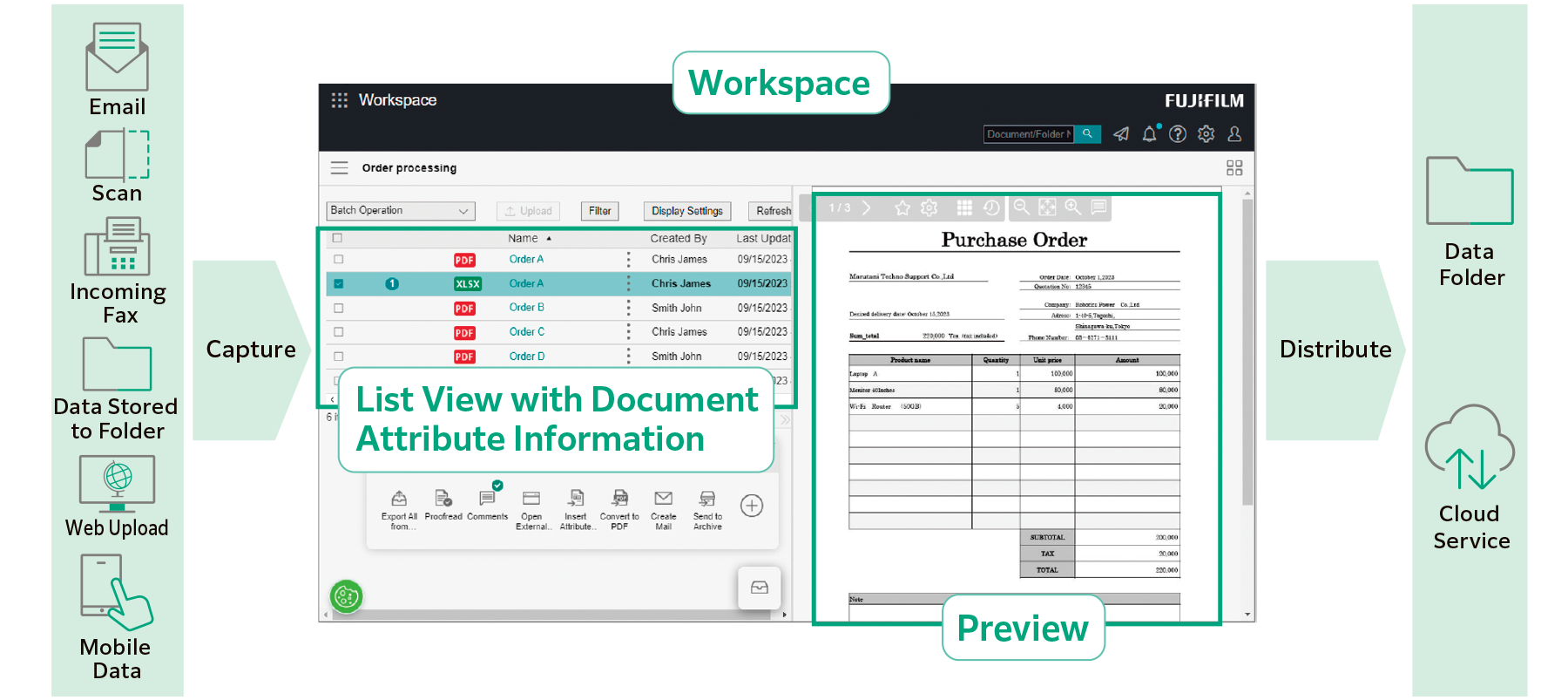
นำเข้าข้อมูลจากแหล่งต่างๆ เช่น เอกสารกระดาษ แฟกซ์ หรืออีเมลขาเข้า และแปลงเป็นข้อมูลดิจิทัลที่สามารถนำไปใช้ในระบบต่างๆ ได้
ระบบจะแสดงข้อมูลตามแอตทริบิวต์เอกสาร เช่น ชื่อบริษัทและ วันที่ เพื่อให้ดูง่ายและป้องกันการมองข้าม
"แอตทริบิวต์" คือข้อมูลที่เกี่ยวข้องกับเอกสาร เช่น ผู้เขียนและวันที่
เมื่อนำเข้าเอกสารด้วย FUJIFILM IWpro แอตทริบิวต์เอกสารจะถูกจัดเก็บไว้ในฐานข้อมูลซึ่งจะนำไปใช้ในฟังก์ชันการค้นหาเอกสารได้
เมื่อใช้ FUJIFILM IWpro คุณจะสามารถเลือกจากเทมเพลตที่หลากหลายที่มาพร้อมกับการดำเนินการกับเอกสารที่กำหนดไว้ล่วงหน้า ช่วยให้งานที่ซับซ้อนกลายเป็นงานแบบอัตโนมัติได้ เช่น การนำเข้าข้อมูลจากเอกสารหลากหลายรูปแบบ การป้อนข้อมูล และการจัดเรียงเอกสารตามโฟลว์งานของคุณ
ด้วยการแปลงรูปแบบไฟล์ การปรับการเอียงและการวางแนวและการลบหน้าว่าง ทำให้ง่ายต่อการจัดการเอกสารในภายหลัง
เอกสารจะถูกแจกจ่ายโดยอัตโนมัติตามกฎที่คุณตั้งไว้ล่วงหน้า เช่น จัดเก็บ หรือส่งไปยังปลายทางต่างๆ ตามลูกค้า หรือตามประเภทงาน
มาพร้อมกับฟังก์ชัน OCR ที่คัดแยกข้อมูลข้อความจากเอกสารโดยอัตโนมัติ ข้อมูลข้อความที่คัดแยกออกมาจะถูกบันทึกและนำไปใช้งานเพื่อการค้นหาและวัตถุประสงค์อื่นๆ ได้
นอกเหนือจากโครงสร้างโฟลเดอร์เอกสารตามมาตรฐานแล้ว ยังมี "มุมมองการจำแนกประเภท" ซึ่งระบบจะแสดงโครงสร้างโฟลเดอร์เสมือนโดยเริ่มต้นจากแอตทริบิวต์ที่คุณระบุได้อีกด้วย
มุมมองการจำแนกประเภทจะช่วยในการค้นหาเอกสารที่คุณต้องการโดยอิงจากวิธีการค้นหาของคุณ
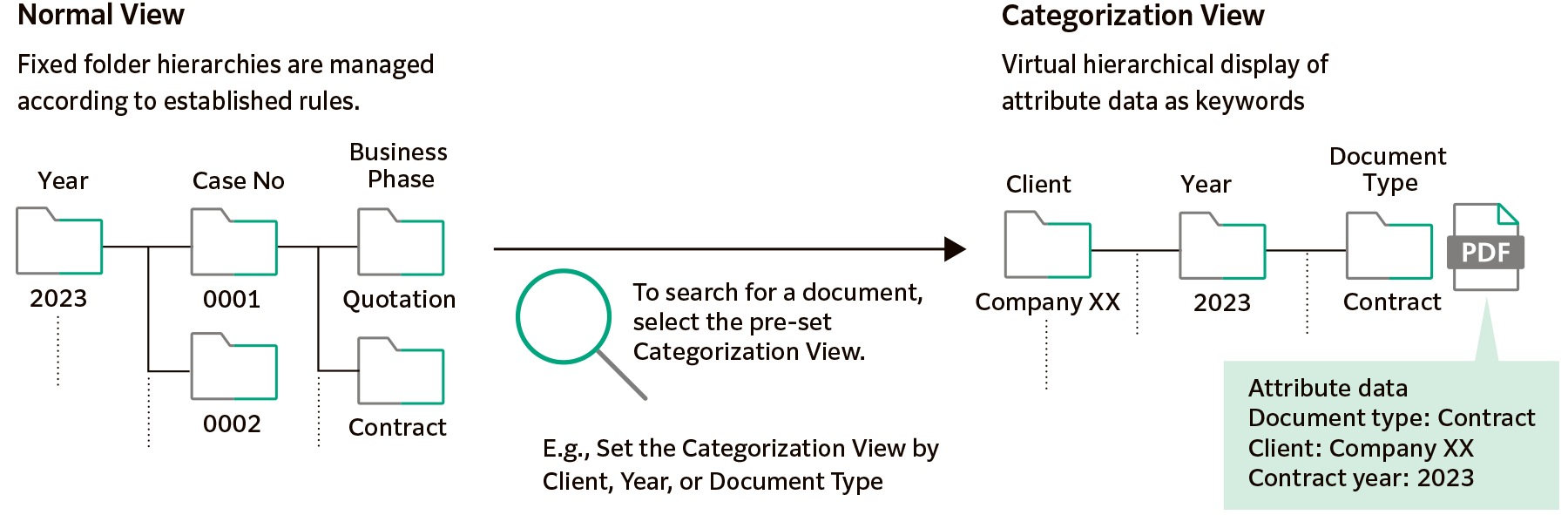
นอกเหนือจากการค้นหาข้อความแบบเต็มและการค้นหาแอตทริบิวต์ตามชื่อลูกค้า วันที่สร้าง ฯลฯ แล้ว คุณยังสามารถใช้ฟังก์ชันการค้นหาที่หลากหลายเพื่อค้นหาเอกสารที่ต้องการได้ รวมถึงการค้นหารูปภาพที่จับสตริงข้อความภายในรูปภาพอีกด้วย
เอกสารสำคัญจะได้รับการคุ้มครองอย่างปลอดภัยโดยการตั้งค่าสิทธิ์การเข้าถึงสำหรับเอกสารหรือโฟลเดอร์แต่ละรายการ
การเข้าถึงจะถูกควบคุมโดยการตั้งค่าสิทธิ์แบบละเอียดสำหรับการดู แก้ไข/อัปเดต ปรับเปลี่ยน และแสดงประวัติของเวอร์ชัน
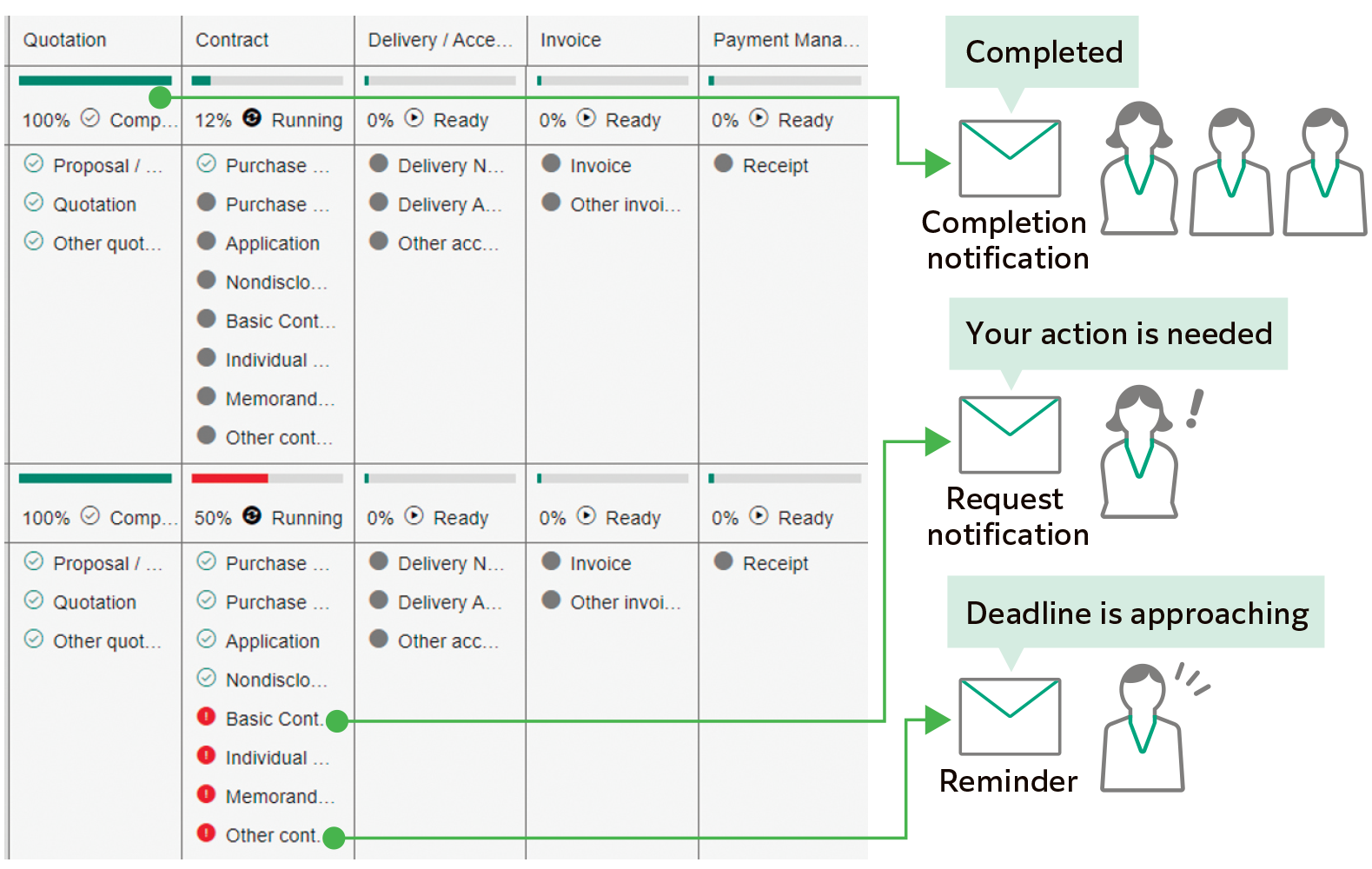
นำเสนอให้เห็นภาพของการดำเนินการและความคืบหน้าต่างๆ ของงาน
ระบุการดำเนินการและข้อมูลที่จำเป็นสำหรับแต่ละขั้นตอนของเวิร์กโฟลว์ ช่วยให้มองเห็นภาพรวมของเวิร์กโฟลว์ได้อย่างชัดเจน
รวมศูนย์สำหรับข้อมูลความคืบหน้าของงาน การตรวจสอบ และการจัดการผลลัพธ์ไว้ในที่เดียว
แจ้งเตือนสำหรับกิจกรรมที่จำเป็นให้ผู้ใช้ทราบโดยอัตโนมัติ
ส่งการแจ้งเตือนไปยังผู้ใช้โดยอัตโนมัติเพื่อแจ้งสถานะของงาน เช่น การขอดำเนินการงาน แจ้งเตือนเมื่องานใกล้ถึงกำหนด
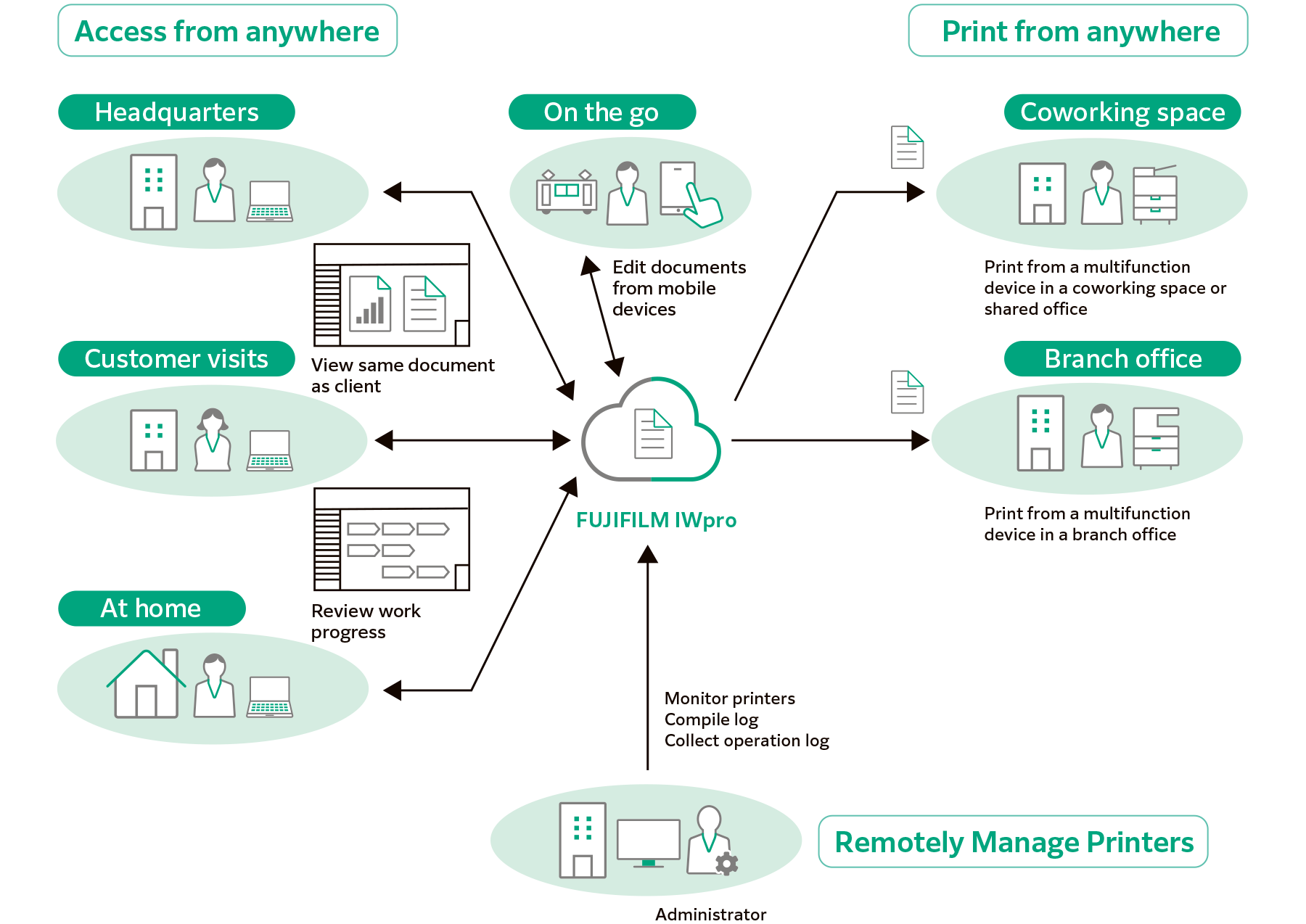
เชื่อมต่อสถานที่ทำงานทุกแห่งด้วยระบบที่คุณสามารถเข้าถึงได้จากทุกที่ ไม่ว่าจะอยู่ที่ใด
รองรับการเข้าถึงจาก Windows OS, Mac OS และอุปกรณ์มือถือ (iOS และ AndroidTM OS)
เข้าถึง FUJIFILM IWpro ผ่านเว็บเบราว์เซอร์ได้จากทุกที่ที่มีบริการอินเทอร์เน็ต เช่น จากสำนักงานสาขาหรือระหว่างเดินทาง
มีสภาพแวดล้อมการพิมพ์แบบปลอดภัยและมีคุณภาพสูงพร้อมให้ใช้งานได้ทุกแห่งไม่ว่าคุณจะอยู่ที่ใด ทั้งในและนอกสำนักงาน
ผูใช้ สามารถเล ้ ือกและพมพิ ์เอกสารทีจϧ ดเก ั ็บไวในระบบคลาวด ้ ์โดยใชอ้ ุปกรณ์มลตั ฟิ งกั ์ชนทั ีอยϧ ูนอกส ่ าํ นกงานได ั ้
การใช้ฟังก์ชัน "ผู้ใช้ที่ใช้ร่วมกัน" จะช่วยให้ผู้ใช้ชั่วคราว เช่น แขกผู้มาเยือนสามารถพิมพ์เอกสารได้โดยไม่ต้องทำการลงทะเบียนผู้ใช้ เพียงอัปโหลดข้อมูลการพิมพ์จากเว็บลิ้งก์ที่ผู้ดูแลให้ไว้ก็พิมพ์งานได้แล้ว
- * ตัวเลือก
การกำหนดค่าการอนุมัติการพิมพ์จะช่วยให้มั่นใจได้ว่าจะเริ่มการพิมพ์ได้ต่อเมื่อได้รับอนุมัติจากหัวหน้างานแล้วเท่านั้น ช่วยป้องกันการรั่วไหลของข้อมูลที่อาจเกิดขึ้นจากการพิมพ์นอกสถานที่ได้อย่างมีประสิทธิภาพ
เมื่อใช้ FUJIFILM IWpro ผู้ดูแลจะสามารถรวบรวมและจัดการสถานะการใช้งานเครื่องพิมพ์จากเว็บเบราว์เซอร์ได้อย่างง่ายดาย ซึ่งจะช่วยลดภาระของผู้ดูแลและยังช่วยลดต้นทุนรวมของธุรกิจได้อีกด้วย
เมื่อผู้ใช้สั่งพิมพ์เอกสารจากอุปกรณ์มัลติฟังก์ชัน ระบบจะแสดงสถานะการใช้งานขึ้นบนแผงควบคุมอุปกรณ์ ให้ผู้ใช้สามารถตรวจสอบจำนวนหน้าที่กำลังพิมพ์ รวมถึงข้อมูลอื่นๆ ได้
เครื่องพิมพ์รุ่นที่รองรับมาพร้อมกับความสามารถในการลงทะเบียนผู้ใช้โดยอัตโนมัติ ช่วยลดขั้นตอนที่ซับซ้อน นอกจากนี้ คุณยังสามารถเลือกการซิงโครไนซ์กับ Microsoft Entra ID* และเซิร์ฟเวอร์ LDAP ได้ ทำให้กระบวนการลงทะเบียนผู้ใช้นั้นง่ายและคล่องตัวยิ่งขึ้น
- * ชื่อเดิม: Microsoft Azure Active Directory (Azure AD)
เราช่วยให้คุณสามารถซื้อผลิตภัณฑ์ วัสดุสิ้นเปลืองและบริการจากเราได้ง่าย ระบบเครือข่ายตัวแทนที่กว้างขวางของเราสามารถช่วยคุณเลือกโซลูชั่นที่เหมาะสมกับความต้องการทางธุรกิจของคุณได้