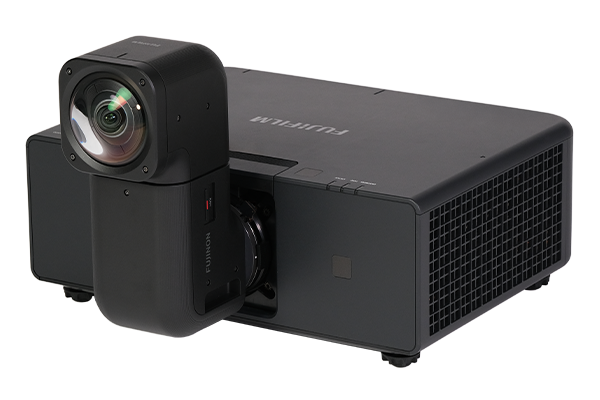



- This software is compatible with only FP-ZUH12000.
- Please use the latest firmware on the main unit when using the Warping and Blending Tool for the FP‑ZUH series.
| Version | Date | Remarks |
|---|---|---|
| 1.9 | 11/05/2026 |
|
* Other minor usability improvements and bug fixes have been immproved.
Warping and Blending Tool License Agreement
This License Agreement ("Agreement") is a legal agreement between you (either an individual or an entity) and FUJIFILM Corporation ("FUJIFILM"), which sets forth the terms and conditions of the license granted for you to use Warping and Blending Tool (“Software”).
By downloading the Software, you agree to be bound by the terms of this Agreement. If you do not agree to the terms of this Agreement, do not download or use the Software. The Software is protected by copyright laws and international copyright treaties, as well as other intellectual property laws and treaties. The Software is licensed, not sold.
1 LICENSE GRANT
(a) Subject to the terms and conditions of this Agreement, FUJIFILM hereby grants to you a non-exclusive, non-transferable and royalty-free license to use the Software solely for controlling the warping and blending function of FUJFIILM’s FP-ZUH series only on your computer (collectively the “Purpose”).
(b) The term of the license in the preceding paragraph starts from the release date of this Agreement and terminated (i) when the Purpose is completed, (ii) when FUJIFILM terminates the license granted to you, by FUJIFILM’s prior written notice, or (iii) when FUJIFILM terminates this Agreement pursuant to the Article 5, whichever is earlier.
(c) Upon the end of the term of the license set forth in the preceding Article, you shall, at your own responsibility and expense, immediately delete the Software including its copies from your computer.
2 RESTRICTIONS
(a) You shall not use the Software for any other purpose other than the Purpose.
(b) You shall not distribute, rent, lease or otherwise transfer all or any part of the Software to any third party without FUJIFILM’s prior written consent. You also shall not sublicense, assign or otherwise transfer all or any part of the rights granted to you by FUJIFILM under this Agreement without FUJIFILM’s prior written consent.
(c) You shall not copy, reproduce, modify, adapt or translate the Software. You also shall not alter or remove copyright and other proprietary notices that appear on or in the Software.
(d) You acknowledge that neither the Software nor any part thereof will be transferred or exported to any country or used in any manner in violation of any export control laws and regulations to which the Software is subject.
(e) You shall not assign or transfer this Agreement or any of the rights and obligations hereunder to any third party without prior written consent of FUJIFILM.
3 DISCLAIMER AND LIMITATION OF LIABILITY
(a) FUJIFILM provides the Software "AS IS" and without warranties of any kind, express or implied. FUJIFILM SHALL MAKE NO WARRANTY, EXPRESS, IMPLIED OR STATUTORY, AS TO ANY OTHER MATTERS, INCLUDING, BUT NOT LIMITED TO NON-INFRINGEMENT OF ANY COPYRIGHT, PATENT, TRADE SECRET, OR ANY OTHER PROPRIETARY RIGHTS OF ANY THIRD PARTY, MERCHANTABILITY, OR FITNESS FOR ANY PARTICULAR PURPOSE.
(b) In no event shall FUJIFILM have any liability for any general, special, direct, indirect, consequential, incidental, or other damages (including damages for loss of profits or lost savings) incurred from the use of or inability to use the Software even if FUJIFILM has been advised of the possibility of such damages.
4 OWNERSHIP
All copyrights and other proprietary rights to the Software are owned and retained by FUJIFILM or the third party suppliers as indicated on or in the Software. Nothing contained herein shall be construed, expressly or implicitly, as transferring or granting any right, license, or title to you other than those explicitly granted under this Agreement.
5 TERMINATION
In case you breach any of the terms and conditions hereof, FUJIFILM may immediately terminate this Agreement without any notice. In this case, you shall immediately delete the Software from your computer.
6 TERM
This Agreement is effective until the date when you delete the Software, unless earlier terminated in accordance with Article 5 hereof. Notwithstanding the preceding sentence, Articles 2, 3, 4, 5, 7 and 8 shall survive any termination or expiration of this Agreement.
7 GOVERNING LAW, JURISDICTION AND VENUE
(a) This Agreement shall be governed by and construed in accordance with laws of Japan without reference to any choice or conflict of laws principles.
(b) Any action or suit under or relating to this Agreement shall only be brought in, and the parties hereby consent and submit to the jurisdiction of, the Tokyo District Court in Tokyo, Japan. In the event of any dispute related to this Agreement, the prevailing party shall be entitled to recover all its expenses related to such dispute including reasonable attorneys’ and experts’ fees and court costs. The Parties hereto shall not raise in connection herewith, and hereby waive, trial by jury and/or any defenses based upon the venue, the inconvenience of the forum, the lack of personal or subject matter jurisdiction or the like in any action or suit arising from such dispute. The parties hereto agree that the judgment, decree or order rendered by a court of last resort or a court of lower jurisdiction from which no appeal has been taken in Tokyo, Japan shall be final and binding upon both parties.
8 MISCELLANEOUS
(a) This Agreement constitutes the entire agreement between you and FUJIFILM and supersedes all prior communications, statements and agreements, written or oral, with respect to the Software.
(b) If it is determined that any provision of this Agreement is invalid or unenforceable, such invalidity or unenforceability shall not render this Agreement in valid or unenforceable as a whole, and such provision shall be changed and interpreted so as to best accomplish the objective of such provision.
Release Date: August 15, 2025
ZIP: 41.0MB
This application enables network monitoring of the operating status of Z projectors in real time.
Registration of up to 255*1 Z projectors on the network and centralized management from a single PC via the network is possible.
- * Not guaranteed to work in all network settings.
- *1 Depends on PC and network conditions.
FUJIFILM PROJECTOR MANAGEMENT TOOL License Agreement
This License Agreement ("Agreement") is a legal agreement between you (either an individual or an entity) and FUJIFILM Corporation ("FUJIFILM"), which sets forth the terms and conditions of the license granted for you to use FUJIFILM PROJECTOR MANAGEMENT TOOL (“Software”).
By downloading the Software, you agree to be bound by the terms of this Agreement. If you do not agree to the terms of this Agreement, do not download or use the Software. The Software is protected by copyright laws and international copyright treaties, as well as other intellectual property laws and treaties. The Software is licensed, not sold.
1 LICENSE GRANT
(a) Subject to the terms and conditions of this Agreement, FUJIFILM hereby grants to you a non-exclusive, non-transferable and royalty-free license to use the Software solely to monitor the status and control the functions of FUJIFILM’s projectors on your computer only (collectively the “Purpose”).
(b) The term of the license in the preceding paragraph starts from the release date of this Agreement and terminated (i) when the Purpose is completed, (ii) when FUJIFILM terminates the license granted to you, by FUJIFILM’s prior written notice, or (iii) when FUJIFILM terminates this Agreement pursuant to the Article 5, whichever is earlier.
(c) Upon the end of the term of the license set forth in the preceding Article, you shall, at your own responsibility and expense, immediately delete the Software including its copies from your computer.
2 RESTRICTIONS
(a) You shall not use the Software for any other purpose other than the Purpose.
(b) You shall not distribute, rent, lease or otherwise transfer all or any part of the Software to any third party without FUJIFILM’s prior written consent. You also shall not sublicense, assign or otherwise transfer all or any part of the rights granted to you by FUJIFILM under this Agreement without FUJIFILM’s prior written consent.
(c) You shall not copy, reproduce, modify, adapt or translate the Software. You also shall not alter or remove copyright and other proprietary notices that appear on or in the Software.
(d) You acknowledge that neither the Software nor any part thereof will be transferred or exported to any country or used in any manner in violation of any export control laws and regulations to which the Software is subject.
(e) You shall not assign or transfer this Agreement or any of the rights and obligations hereunder to any third party without prior written consent of FUJIFILM.
3 DISCLAIMER AND LIMITATION OF LIABILITY
(a) FUJIFILM provides the Software "AS IS" and without warranties of any kind, express or implied. FUJIFILM SHALL MAKE NO WARRANTY, EXPRESS, IMPLIED OR STATUTORY, AS TO ANY OTHER MATTERS, INCLUDING, BUT NOT LIMITED TO NON-INFRINGEMENT OF ANY COPYRIGHT, PATENT, TRADE SECRET, OR ANY OTHER PROPRIETARY RIGHTS OF ANY THIRD PARTY, MERCHANTABILITY, OR FITNESS FOR ANY PARTICULAR PURPOSE.
(b) In no event shall FUJIFILM have any liability for any general, special, direct, indirect, consequential, incidental, or other damages (including damages for loss of profits or lost savings) incurred from the use of or inability to use the Software even if FUJIFILM has been advised of the possibility of such damages.
4 OWNERSHIP
All copyrights and other proprietary rights to the Software are owned and retained by FUJIFILM or the third party suppliers as indicated on or in the Software. Nothing contained herein shall be construed, expressly or implicitly, as transferring or granting any right, license, or title to you other than those explicitly granted under this Agreement.
5 TERMINATION
In case you breach any of the terms and conditions hereof, FUJIFILM may immediately terminate this Agreement without any notice. In this case, you shall immediately delete the Software from your computer.
6 TERM
This Agreement is effective until the date when you delete the Software, unless earlier terminated in accordance with Article 5 hereof. Notwithstanding the preceding sentence, Articles 2, 3, 4, 5, 7 and 8 shall survive any termination or expiration of this Agreement.
7 GOVERNING LAW, JURISDICTION AND VENUE
(a) This Agreement shall be governed by and construed in accordance with laws of Japan without reference to any choice or conflict of laws principles.
(b) Any action or suit under or relating to this Agreement shall only be brought in, and the parties hereby consent and submit to the jurisdiction of, the Tokyo District Court in Tokyo, Japan. In the event of any dispute related to this Agreement, the prevailing party shall be entitled to recover all its expenses related to such dispute including reasonable attorneys’ and experts’ fees and court costs. The Parties hereto shall not raise in connection herewith, and hereby waive, trial by jury and/or any defenses based upon the venue, the inconvenience of the forum, the lack of personal or subject matter jurisdiction or the like in any action or suit arising from such dispute. The parties hereto agree that the judgment, decree or order rendered by a court of last resort or a court of lower jurisdiction from which no appeal has been taken in Tokyo, Japan shall be final and binding upon both parties.
8 MISCELLANEOUS
(a) This Agreement constitutes the entire agreement between you and FUJIFILM and supersedes all prior communications, statements and agreements, written or oral, with respect to the Software.
(b) If it is determined that any provision of this Agreement is invalid or unenforceable, such invalidity or unenforceability shall not render this Agreement in valid or unenforceable as a whole, and such provision shall be changed and interpreted so as to best accomplish the objective of such provision.
Release Date: Feb 29th, 2024
ZIP: 11.0MB
When using this software with the FP-Z8000/FP-Z6000, the firmware version should be 2.00 or later.
To use this software, you must install “FUJIFILM PROJECTOR CONTROLER” beforehand.
- * The FP-Z5000 is not compatible.
For specific installation instructions of FUJIFILM PROJECTOR MANAGEMENT TOOL, refer to the following manual (PDF) .
- Do not turn off the power until the firmware update is complete.
- Please refer to the link below for instructions on how to update the firmware.
- This firmware is exclusively for the FP-ZUH12000.
| Version | Date | Remarks |
|---|---|---|
| 1.0.8 | 18/05/2026 |
|
Please read this Agreement carefully before downloading this upgraded version software (“FIRMWARE”). By downloading FIRMWARE, you are agreeing to be bound by the terms of this Agreement. If you do not agree to the terms of this Agreement, you are not authorized to download FIRMWARE.
Article 1. License
FIRMWARE is the upgraded version of software that FUJIFILM Corporation. (“FUJI”) already distributed to you included with FUJI’s product(s) (“ORIGINAL FIRMWARE”). All copyrights and other proprietary rights to FIRMWARE are retained by FUJI, and nothing contained herein shall be construed, expressly or implicitly, as transferring or granting to you any right, license, or title unless otherwise explicitly granted under this Agreement.
Article 2. NO Warranty
FUJI EXPRESSLY DISCLAIMS ANY WARRANTY FOR SOFTWARE. SOFTWARE IS PROVIDED “AS IS” WITHOUT WARRANTY OF ANY KIND, EITHER EXPRESSED OR IMPLIED, INCLUDING, BUT NOT LIMITED TO, THE IMPLIED WARRANTIES OF MERCHANTABILITY, FITNESS FOR A PARTICULAR PURPOSE, OR NON-INFRINGEMENT OF COPYRIGHT, PATENT, TRADE SECRET, OR ANY OTHER PROPRIETARY RIGHTS OF ANY THIRD PARTY. IN NO EVENT SHALL FUJI BE LIABLE FOR ANY GENERAL, SPECIAL, DIRECT, INDIRECT, CONSEQUENTIAL, INCIDENTAL, OR OTHER DAMAGES RESULTING FROM THE USE OF OR INABILITY TO USE SOFTWARE.
Article 3. Restrictions
You shall not, or shall not have any third party, reverse-engineer, decompile, or disassemble FIRMWARE.
Extended Warranty Service for Commercial Projectors
To provide you with greater peace of mind when using our commercial projectors, we offer an optional 2-year extended warranty service after the manufacturer’s standard warranty period (up to a maximum of 3 years*2), extending your total coverage to up to 5 years.
By subscribing to the extended warranty service, you can receive repair support at no additional cost*3 during the warranty period in the unlikely event of a product failure.
- *2 The basic warranty period is 1 year. To extend it to 3 years, product registration is required.
The extended warranty covers the projector unit only.
Lenses are covered by the standard manufacturer’s warranty only. - *3 Please note that any maintenance work without a failure will be charged to the customer. Also, used products do not qualify for the extended warranty service.


The extended warranty covers up to 2 years following the expiration of the manufacturer’s warranty.
After purchasing the extended warranty license, please register your product using the form below.
During the warranty period, we will provide free repair service.
The following items are not covered under the warranty. Please understand this in advance.
- Troubleshooting and fault isolation work on projectors and connected devices
- Removal from the installed condition, packaging work, unboxing of repaired products, and reinstallation work
- Laser light source parts used for brightness recovery that are not due to malfunction
- Consumables (e.g., dust filters) costs
- Malfunctions caused by usage methods that do not comply with the manufacturer's warranty terms
Please refer below for the terms and conditions of the extended warranty.
After purchasing the extended warranty license, please register your product and license ID using the link below.
Once your extended warranty registration is complete, we will send you an email confirming the completion of your extended warranty.
![[photo] Fujifilm Projector FP-ZUH6000](https://asset.fujifilm.com/www/kz/files/2025-06/d9ce920f6edc1af044ed306131a0021b/thumb_fpzuh6000_01.png)
![[photo] Fujifilm Z Projector FP-Z8000](https://asset.fujifilm.com/www/kz/files/2021-03/de7aa0577405cef1f2af8a582cb93720/thumb_fpz8000_01.png)