


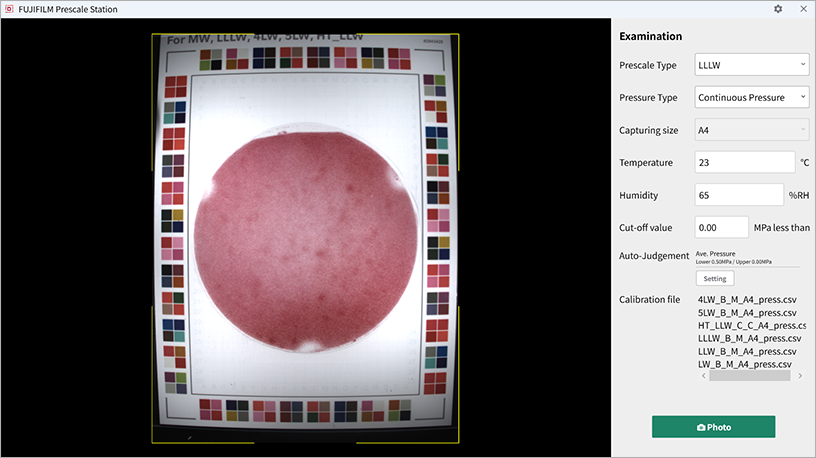
Set the following items:
- Prescale Type
- Pressure Type (Momentary Pressure / Continuous Pressure)
- Capturing Size
- Temp.
- Humid.
- Invalid pressure*¹ (Optional)
- *1 Pressure values lower than the set value will be invalidated.
You can get the system to carry out automatic Pass/Fail judgments and display the analytical results by setting a threshold value/range in advance.
- ON/OFF: Setting for Auto Judgement.
- The judgment will be “Pass” if the analysis result is within the set value/range.
Press “Photo” button to check the captured image.
Press “Inspection” button to inspect Prescale.

- Automatically add inspection frames: Press “Auto Frame” button to automatically set inspection frames on colored areas of 1cm2 or larger.
- Add square frames: Press “Add frame” icon and dragging the image will add a square inspection frame.
You can set the area of the captured image to be excluded from the inspection. Press “Erase” icon and fill in the areas that you want to be excluded from inspection.

Press “Analyze Result” button to display the inspection results. Items can be viewed by clicking the arrows which is placed below "Average Pressure". You can also check the Pass/Fail judgment results.
Press “Download” button to export the measurement results, images, and pressure maps.
Press “To Photo” button to return to the reading screen. Previous settings will be retained.
| Item | Unit | Explanation |
|---|---|---|
| Measured surface area | mm2 | The area of the specified area and the area to be processed |
| Pressured area | mm2 | The area over which color is produced |
| Pressure efficiency | % | The percentage of colored area |
| Effective Rate | % | The percentage of the colored area within the recommended pressure range for the applicable Prescale |
| Ave. Pressure | MPa | The average pressure in the area over which color is produced |
| Max. Pressure | MPa | The maximum pressure in the area over which color is produced |
| Min. Pressure | MPa | The minimum pressure in the area over which color is produced |
| Weight | N | The weight on the area over which color is produced (calculated based on the product of the pressured area and the average pressure) |
| SD | The standard deviation of pressure | |
| Pressure uniformity | % | An index indicating the uniformity across the area over which color is produced |
- Measurement Results: Information shown on the history screen (Prescale type, Pressure type, etc.) and analysis results (Average Pressure, Pressure Area, etc.)
- Images: Image files, such as captured original images, analysis images, and color bar images
- Pressure Maps: Output data on the pressure value of each cell. The resolution of each cell can be adjusted separately.