



This site is your direct connection to Fujifilm purchasing, bringing together everything you need as a supplier to stay informed, access resources, and manage processes. The SAP Business Network is designed to provide you with access to update all your information, from your address to your banking details, securely and conveniently. Updates can be made at your convenience 24 hours a day. This connection simplifies communication between you and Fujifilm and helps us to work better, together.
As we continue to integrate our vendors into the SAP Business Network to improve sourcing and procurement, we’ve prepared step-by-step guides, FAQs, and support tools to help you get started and make the most of the system.

Get started using the SAP Business Network by following the steps outlined in your email invitation.
The process is quick and straightforward — just three simple steps:
Register for an SAP Business Network account.
Complete the Registration Questionnaire(s).
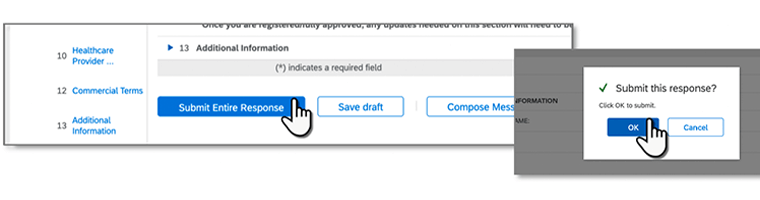
Be sure to "Submit Entire Response" and click "OK" to complete your submission. After registration, you will receive an email confirmation.
Check out our quick reference guide for step by step instructions for registration and onboarding.
SAP Business Network (aka SAP Ariba) – a cloud-based procurement technology platform – for sourcing, supplier management, purchasing, and accounts payable processes. Suppliers must register on the SAP Business Network.
SAP Business Network is a global e-commerce platform that enables buyers (such as Fujifilm) and suppliers (such as your organization) to form relationships and conduct business transactions online for activities across end-to-end procurement processes. To learn more, visit ariba.com/ariba-network.
There are 3 steps all suppliers are required to complete in order to do business with Fujifilm:
- Register for free for an SAP Business Network account (if you don’t have an existing one already)
- Complete the Fujifilm Registration Questionnaire – This is where you’ll provide key information Fujifilm requires for doing business together, such as addresses, banking & remittance details, etc.
- Submission Confirmation – Be sure to "Submit Entire Response" and click "OK" to complete your submission. After registration, you will receive an email confirmation.
Once invited to register and self-manage your information with Fujifilm, you will receive an email notification with a link to complete the registration process in Ariba.
- If you have an existing SAP Business Network account, you will click the link, then log-in and access the questionnaire from your ‘Ariba Proposals & Questionnaires’ page.
- If you do NOT have an existing SAP Business Network account, you must sign up by completing a standard form. SAP requires all new suppliers to fill in basic company and user information. This is not specific to Fujifilm; however, it must be completed to access the registration questionnaire. Note: It is completely free to join with a standard account on Ariba.
Upon submission, your questionnaire will automatically route for review and approval by Fujifilm. You should see a successful registration message.
- If any data is invalid and/or additional information is required, you will receive an email requesting you to revise your response and re-submit for processing.
- If there are no issues, you will receive an email confirming your registration is complete and fully approved. The questionnaire status will appear as “Registered” in your SBN account.
- Please be sure to submit the questionnaire. Saving it doesn't submit it for review.
If your registration is complete and fully approved by Fujifilm, you will submit any updates via self- service directly from the questionnaire in your SBN account (specifically found on the ‘Ariba Proposals & Questionnaires’ page in your account). If your registration is NOT yet complete, please contact Fujifilm via email below.
Please contact HLUS-AribaSAP@fujifilm.com with any questions or issues. Additional support directly from SAP is also available as needed; to get started, click here.